
Videography
The Animated Dance Video 41 Million People Watched Has a Lesson for Small Crews
Fortiche's FIRESTARTER is huge, but its useful idea is simple: plan who the camera follows before adding effects. Here is a small shoot you can try.

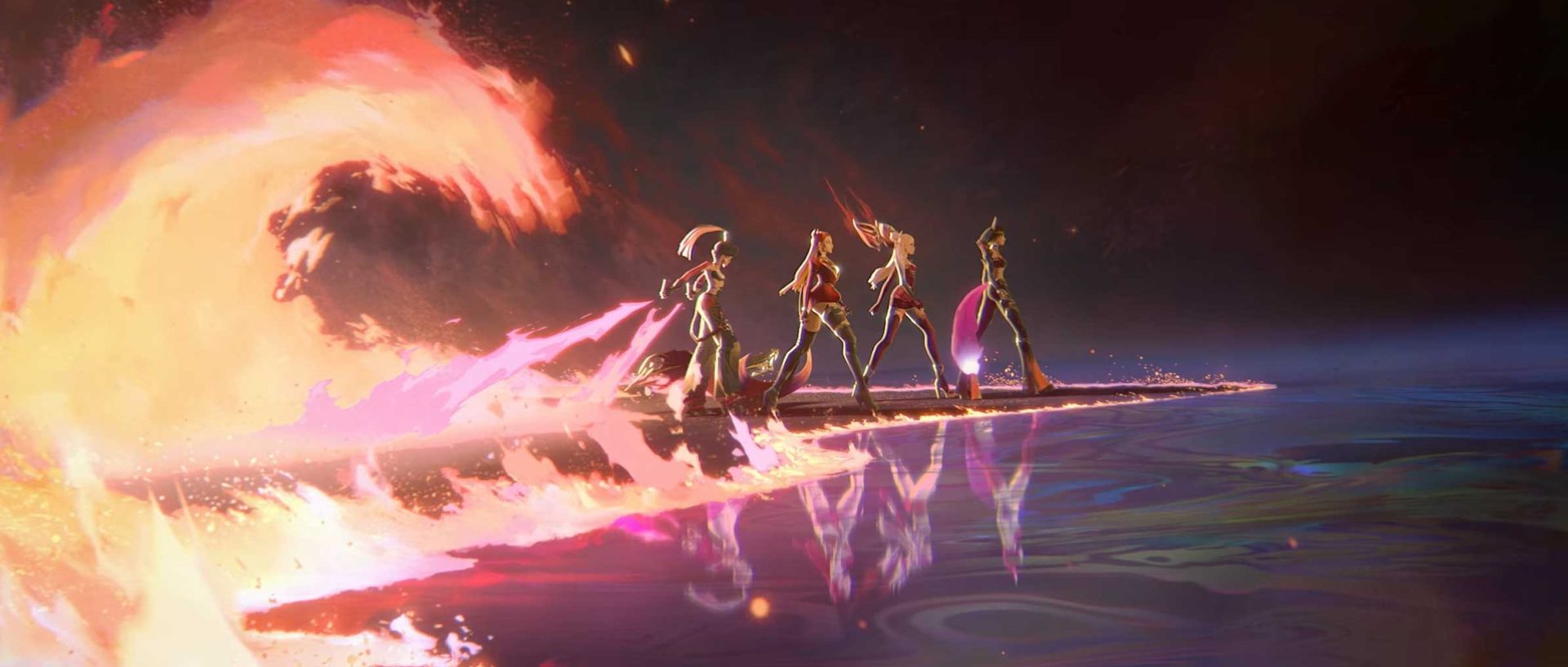
There is a moment in K/DA's FIRESTARTER when the performance seems to carry the camera along with it. Characters, light and effects keep changing, yet the motion feels connected. The official music video had more than 41 million YouTube views by 5 November 2026. So yes, people are watching. What can a videographer with one camera borrow from the thinking without pretending to have an animation studio behind them?
The answer is choreography before polish. Fortiche's making-of conversation shows a production organised around character, movement and musical rhythm. The light and effects make the shots spectacular, but they are following a performance plan. That is a useful order of work even when your entire crew is you and a mate holding a lamp.
Start with what the camera is following
FIRESTARTER is a 2026 music video for Riot Games' virtual group K/DA, directed by Marietta Ren at Fortiche. Riot lists the video among its October releases; Stash's production coverage names storyboard artists Benjamin Warnitz and Joséphine Meis and choreographer Sean Bankhead. Fortiche's own behind-the-scenes video had passed 300,000 views by 5 November.
Those credits matter because it is tempting to describe the whole thing as a clever effects reel. The production account describes the team working out distinct character identities, using professional choreography and building long, apparently continuous shots that respond to the music through lighting and effects. It is a music video first. The camera has to know whose moment it is and where the viewer's eye should go next.
If you cut a concert clip or a dance reel, you have probably felt the problem from the other side. You have plenty of beautiful footage, but every angle feels equally important. The edit starts chasing spectacle instead of following an action. A long moving shot makes that mistake harder to hide. You need the next reveal prepared before the camera reaches it.
I would not call the entire finished video “one take.” Animation and compositing make that label slippery, and the making-of discusses long single-take sections. The practical lesson is the feeling of continuous attention: one move hands the viewer to the next. You can study that without claiming to reproduce Fortiche's pipeline.
Watch it once for movement, then once without the spectacle
On the first viewing, enjoy the finished film. On the second, try a slightly unromantic exercise: pause at the start of a sequence and write down what occupies the centre of your attention every few beats. Is it a face, a hand, a change in formation, a bright background or a camera move? When does the lighting switch? Does that switch reveal a new subject, or just make the existing subject louder?
This is where the official choreography release helps. A physical dance gives you a simpler version of the timing problem. The animated video can exaggerate a turn, stretch a gesture or move through impossible space, but the underlying music still has counts and phrases. The two sources make a useful comparison for editors: the live performance shows the beat map; the animated film shows how the visual world responds to it.
Keep an eye on the foreground, too. When something crosses close to the camera, the frame can become a natural hiding place for a transition. That does not mean every whip pan or passing shoulder should conceal a cut. If the subject's position jumps or the energy changes for no reason, viewers feel the trick even when they cannot name it. The transition works when it continues an action they already understand.
A 15-second version you can actually shoot
I have not recreated FIRESTARTER, and copying its characters, track or exact choreography would miss the point. Try this with your own subject and music you made or have permission to use. The goal is one short sequence that feels designed from beginning to end.
- Choose one action. A maker lays three objects on a bench, a dancer crosses a room, or a musician reaches for an instrument. Write the action in one sentence. If you need five sentences, shrink the idea.
- Mark eight beats. Play a 15-second stretch of your audio and mark eight moments on paper. Four can be movement cues; the others can be a light change, foreground pass, turn or reveal. You do not need to hit every beat with an effect.
- Draw eight tiny frames. Stick figures are fine. Show where the subject starts, where the camera ends, and what will cover or clear the lens. Check that the viewer can identify the subject in every frame.
- Rehearse without recording. Walk the route with your phone. If you need to step backwards, clear the floor and use someone to spot you. Do not sacrifice a safe camera path for a clever transition.
- Shoot one plain pass. Leave the effects out. Review whether the action reads on a phone screen with the sound muted. If it does not, move the subject or camera before adding lights.
- Add one change. Try a lamp switching on behind the subject or a piece of coloured card passing close to lens. Record a second pass and compare it with the plain one.
That comparison is the result. Did the change point your eye at the next action, or did it simply announce itself? If your friend watching on a phone cannot tell what happened, the lighting is not rescuing the story. Make the action clearer first.
One more check is worth doing before you call it finished. Play the sequence once with the sound muted, then once with the music. Without sound, the direction of movement and the change of subject should still make sense. With sound, the changes should land near a musical moment rather than arriving late because you liked the look of a clip. If the silent version is confusing, add a wider establishing frame or hold the subject longer. Music can give a shot energy, but it cannot tell the viewer which of three faces to follow.
For an edit rather than a single shot, use the same eight-frame plan. Match the subject's direction and body position across a cut, then make the sound and light changes serve the hand-off. You can create a continuous feeling with a few carefully planned shots; you do not need a camera move that crosses the building.
What I would take, and what I would leave
The film's scale is not a realistic benchmark for a small commercial shoot. Character animation, choreography, storyboarding and VFX all have specialist labour behind them. If a client asks for “something like that” on a one-day budget, show them the making-of before talking numbers. It makes the work visible.
What is worth taking is the order: decide who owns the moment, plan the motion, test whether the shot reads, then add spectacle. I would rather see a clean 15-second performance with one excellent hand-off than a minute of unrelated effects. The big video earns its scale because the team has organised the viewer's attention underneath it.
Watch the official FIRESTARTER video, open Fortiche's making-of, then storyboard eight beats from your own track or a properly licensed one. Shoot the plain version before the lit version. That tiny before-and-after is a far more useful lesson than trying to copy a 41-million-view finish.
Sources
Share this article
Know someone who would enjoy this? Pass it along.