
Print & Packaging
Why Your Bright Print Colours Come Back Muddy
Neon RGB colours can turn dull in CMYK printing. Here is the quick proofing routine to use before ordering a box of disappointing stock in bulk.
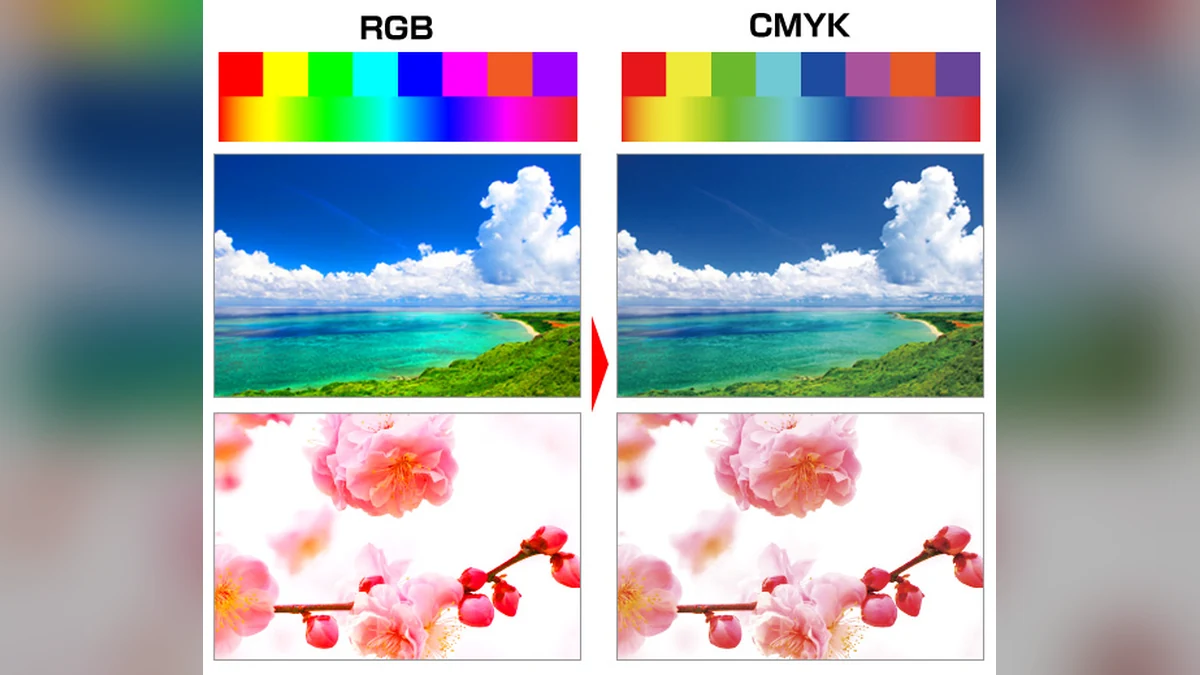
Your screen is cheating
That electric blue logo looks incredible on a phone because the screen is making colour with light. Printing has to fake the same excitement by putting ink on paper, which is a much less glamorous arrangement.
Screens normally use RGB. Commercial printing commonly uses CMYK. The printable range is smaller, so vivid blues, greens, purples and hot pinks can shift or lose intensity when converted. The printer has not necessarily ruined your artwork. Your monitor showed you a colour the ink could never reproduce.
Canva’s print-colour guide shows the problem plainly, including the ultra-bright colours most likely to soften in print.
Stop converting at the last second
Ask the printer what profile and file format it wants. Some workflows expect CMYK artwork; some desktop and print-on-demand systems prefer sRGB and handle conversion themselves. Do not convert because somebody on a forum shouted “CMYK” in 2014.
If your printer supplies an ICC profile, use it for a soft proof. Adobe describes soft proofing as an on-screen simulation of the output device. It is useful, not psychic: the result still depends on the monitor, its calibration, the paper and the lighting.
Check four things before ordering quantity:
- View the design with the correct proof profile.
- Inspect saturated colours for obvious dulling or hue shifts.
- Confirm bleed, safe margins and image resolution.
- Order one physical sample on the real stock.
Paper is part of the colour
Gloss, matte, uncoated, recycled and coloured stocks do not reflect light in the same way. A warm uncoated sheet can soften colour beautifully—or make a pale beige brand disappear like it owes money.
Keep the approved physical sample. Label it with the printer, stock, finish, date and file version. Next time, you are matching a real object instead of arguing with two glowing rectangles.
Try this first: Print one page containing your five main colours, small black text and a photograph on the intended stock. Approve that sheet before the full run.